LangChain Explained: How to Connect LLMs, APIs, and Data Into Production AI Systems

- Published on
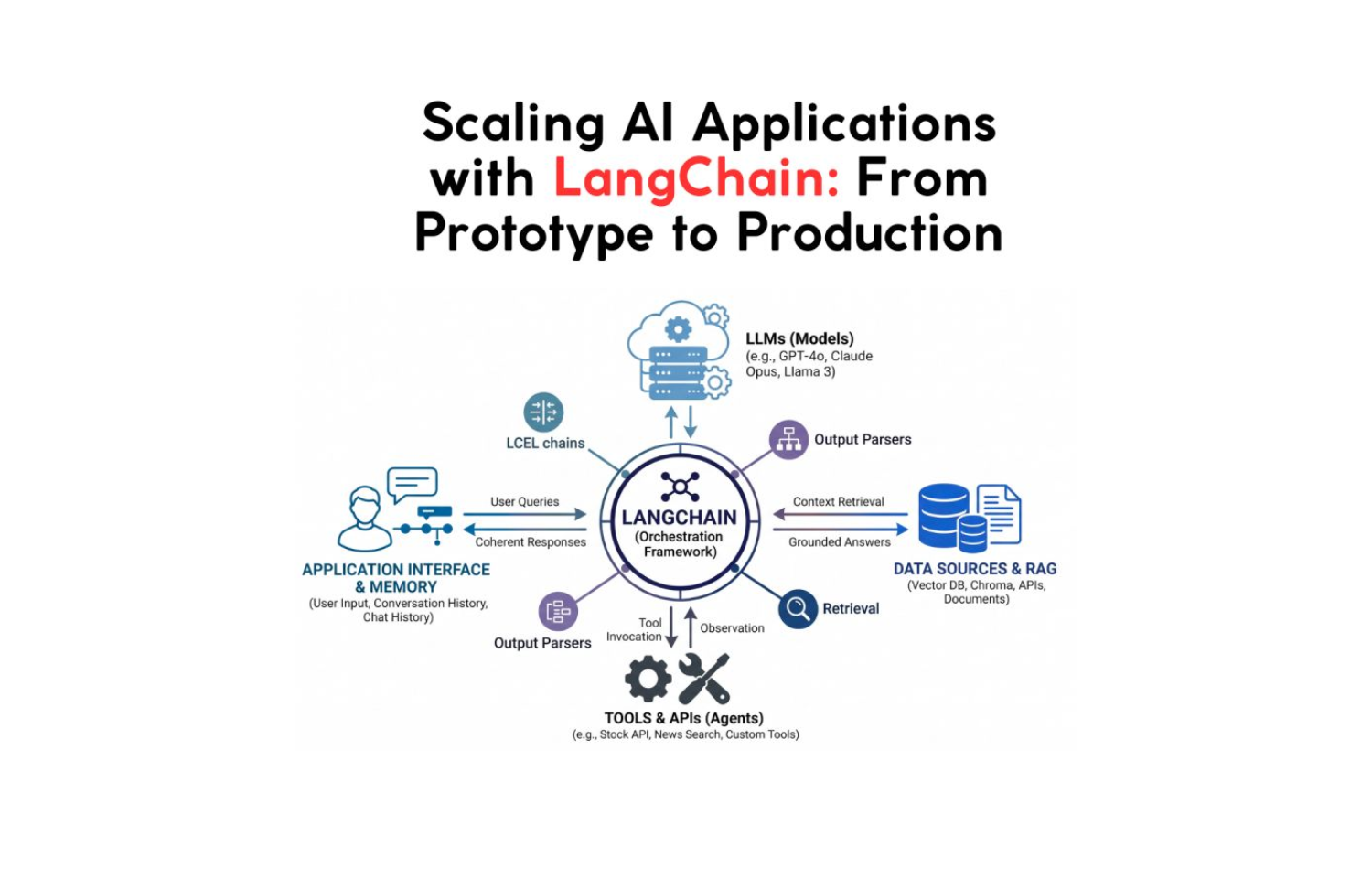
You have an LLM. You have APIs. You have a database full of data that the LLM has never seen. And you have a user who wants answers that require all three working in concert.
Without a framework, you are writing glue code. Prompt string concatenation, manual memory serialization, custom retrieval loops, bespoke tool execution logic. Each piece works in isolation. Integrating them becomes an engineering project of its own, one that is brittle, hard to test, and difficult to extend.
That is the gap LangChain was designed to close.
LangChain is not a model. It is not a database. It is the connective tissue between the components that make up a production AI application, the framework that turns a capable LLM into a context-aware, data-connected, tool-using system that can reason across multiple steps and maintain coherent state over time.
This is a deep breakdown of how it actually works.
The Core Problem LangChain Solves
A raw LLM call has one input and one output. You send a prompt. You get a response. Everything that makes an AI application useful, memory across turns, grounding in external data, the ability to take actions, requires you to build the scaffolding yourself.
Without a framework, a basic customer support chatbot requires:
- Prompt construction that injects the conversation history correctly
- A retrieval system that fetches relevant documentation
- Logic to decide when to call an external API vs. answer from context
- Memory management that does not explode the context window on long conversations
- Error handling for when the LLM returns something unexpected
Each one of these is a solved problem individually. Together, without a shared abstraction, they become a maintenance burden. LangChain provides the abstractions that let you compose these pieces cleanly, and swap components without rewriting the integration layer.
The Five Core Abstractions
1. Models
LangChain wraps LLM providers behind a unified interface. Whether you are calling OpenAI, Anthropic, Google Gemini, a local Ollama model, or a fine-tuned model on Hugging Face, the calling convention is identical. You swap the provider by changing the model initialization, nothing else in the chain changes.
from langchain_openai import ChatOpenAI
from langchain_anthropic import ChatAnthropic
from langchain_community.llms import Ollama

# Same interface, different providers
llm_openai = ChatOpenAI(model="gpt-4o", temperature=0.2)
llm_claude = ChatAnthropic(model="claude-opus-4-7")
llm_local  = Ollama(model="llama3.2")

# Identical call regardless of provider
response = llm_openai.invoke("What is the current Fed funds rate?")
This provider abstraction is the foundation that makes LangChain applications portable. If OpenAI's pricing changes, or you want to run a task on a cheaper model, you change one line, not the integration layer.
LangChain also distinguishes between LLMs (completion models that take a string and return a string) and Chat Models (models that take a list of messages and return a message). Modern production applications almost always use Chat Models, which preserve the role structure (system, user, assistant) that makes context management coherent.
2. Prompt Templates
Prompt engineering at scale is not about writing clever one-off prompts. It is about building reusable, parameterized prompt components that render correctly for any input.
LangChain's PromptTemplate and ChatPromptTemplate separate the static structure of a prompt from the dynamic variables injected at runtime.
from langchain_core.prompts import ChatPromptTemplate

# Define once, reuse everywhere
analysis_prompt = ChatPromptTemplate.from_messages([
    ("system", """You are a senior financial analyst at JMS Technologies.
Analyze the data provided and return structured insights.
Always quantify uncertainty. Never hallucinate specific numbers not in the provided data.
Output format: {output_format}"""),
    ("human", "Analyze this data for {company_name}:\n\n{data}")
])

# Runtime: inject variables
formatted = analysis_prompt.format_messages(
    output_format="JSON with keys: summary, risks, opportunities",
    company_name="Stripe",
    data=loaded_data
)
The separation matters for production. Template logic lives in one place. Variable injection is explicit and testable. You can unit test prompts without calling the LLM. You can version control prompt templates independently of application logic.
Few-shot templates, where you include examples in the prompt dynamically, are also supported. You can select which examples to include at runtime based on semantic similarity to the user's input, which is significantly more effective than static few-shot examples for high-variance task distributions.
3. Chains and LCEL
Chains are the composition primitive. A chain is a sequence of components, prompts, models, parsers, retrievers, tools, where the output of each step becomes the input of the next.
LangChain Expression Language (LCEL) introduced a clean pipe syntax for declaring chains:
from langchain_core.output_parsers import StrOutputParser, JsonOutputParser
from langchain_core.prompts import ChatPromptTemplate
from langchain_openai import ChatOpenAI

llm = ChatOpenAI(model="gpt-4o-mini")

# Basic chain: prompt → model → parser
basic_chain = (
    ChatPromptTemplate.from_template("Summarize this in 3 bullet points: {text}")
    | llm
    | StrOutputParser()
)

result = basic_chain.invoke({"text": long_document})
The | operator composes Runnables, any component that implements invoke, stream, and batch. LCEL chains are automatically composable, streamable, and parallelizable. If two steps do not depend on each other, LCEL can run them in parallel without any additional configuration.
from langchain_core.runnables import RunnableParallel

# Run sentiment and entity extraction in parallel, one LLM round trip saved
parallel_chain = RunnableParallel(
    sentiment=sentiment_chain,
    entities=entity_chain,
    summary=summary_chain
)

# All three execute concurrently
result = parallel_chain.invoke({"text": document})
# result = { "sentiment": "...", "entities": [...], "summary": "..." }
For branching logic, routing different inputs to different chains, LCEL supports RunnableBranch and lambda routing functions. You can build chains that inspect input content and route to different specialized sub-chains based on the content type, language, or intent.
4. Memory
Stateless LLM calls cannot hold a conversation. Every message is isolated. Memory in LangChain is the mechanism that reconstructs state across turns, taking what has happened in prior interactions and injecting the relevant context into each new prompt.
LangChain provides several memory strategies, each with different cost/quality tradeoffs:
# Buffer memory, full conversation history (expensive at scale)
from langchain.memory import ConversationBufferMemory

buffer_memory = ConversationBufferMemory(return_messages=True)

# Window memory, only last N turns (cost-bounded)
from langchain.memory import ConversationBufferWindowMemory

window_memory = ConversationBufferWindowMemory(k=5, return_messages=True)

# Summary memory, LLM summarizes old context progressively (best for long sessions)
from langchain.memory import ConversationSummaryBufferMemory

summary_memory = ConversationSummaryBufferMemory(
    llm=llm,
    max_token_limit=1000
)
For production applications, the right memory strategy depends on the session characteristics. Short, bounded sessions use buffer memory. Long support conversations use summary memory that compresses old context as the session grows. Applications with many concurrent sessions store memory in a database (Redis, DynamoDB, Postgres) so state persists across requests and scales horizontally.
# Production: externalized memory with Redis backend
from langchain_community.chat_message_histories import RedisChatMessageHistory

def get_session_history(session_id: str):
    return RedisChatMessageHistory(session_id, url=REDIS_URL)

# Memory tied to a session ID, survives server restarts, scales across instances
This is the pattern that makes an AI application feel like it remembers you rather than treating every interaction as the first.
5. Output Parsers
LLM outputs are strings. Production applications need structured data. Output parsers bridge the gap, they instruct the model on the expected output format and parse the response into typed objects.
from langchain_core.output_parsers import JsonOutputParser
from langchain_core.pydantic_v1 import BaseModel, Field
from typing import List

class ProductAnalysis(BaseModel):
    product_name: str = Field(description="Name of the product")
    sentiment: str = Field(description="positive, negative, or neutral")
    key_issues: List[str] = Field(description="List of identified issues")
    confidence_score: float = Field(description="Confidence from 0 to 1")

parser = JsonOutputParser(pydantic_object=ProductAnalysis)

prompt = ChatPromptTemplate.from_messages([
    ("system", "Analyze the review and return structured data.\n{format_instructions}"),
    ("human", "{review}")
]).partial(format_instructions=parser.get_format_instructions())

chain = prompt | llm | parser

# Returns a typed ProductAnalysis object, not a string
result: ProductAnalysis = chain.invoke({"review": customer_review})
print(result.sentiment)       # "negative"
print(result.key_issues)      # ["battery life", "charging speed"]
print(result.confidence_score) # 0.94
Structured output removes the parsing logic from application code and makes LLM responses directly consumable by downstream services without custom string manipulation.
RAG: Grounding LLMs in Your Data
Retrieval-Augmented Generation is the pattern that makes LLMs useful for domain-specific knowledge. Instead of relying on the model's training data, which has a knowledge cutoff and contains nothing about your specific products, customers, or internal documentation, RAG dynamically retrieves relevant information at inference time and provides it as context.
LangChain's retrieval primitives compose directly into chains:
from langchain_openai import OpenAIEmbeddings
from langchain_community.vectorstores import Chroma
from langchain.text_splitter import RecursiveCharacterTextSplitter
from langchain_core.runnables import RunnablePassthrough

# Step 1: Load and chunk documents
from langchain_community.document_loaders import PyPDFLoader

loader = PyPDFLoader("product_documentation.pdf")
documents = loader.load()

splitter = RecursiveCharacterTextSplitter(
    chunk_size=1000,
    chunk_overlap=200
)
chunks = splitter.split_documents(documents)

# Step 2: Embed and store
embeddings = OpenAIEmbeddings()
vectorstore = Chroma.from_documents(chunks, embeddings)
retriever = vectorstore.as_retriever(search_kwargs={"k": 5})

# Step 3: Build the RAG chain
rag_prompt = ChatPromptTemplate.from_messages([
    ("system", """Answer using ONLY the provided context.
If the answer is not in the context, say "I don't have that information."
Do not fabricate details.

Context:
{context}"""),
    ("human", "{question}")
])

def format_docs(docs):
    return "\n\n".join(doc.page_content for doc in docs)

rag_chain = (
    {"context": retriever | format_docs, "question": RunnablePassthrough()}
    | rag_prompt
    | llm
    | StrOutputParser()
)

# Grounded answer, pulls from your documents, not the model's training data
answer = rag_chain.invoke("What is the return policy for enterprise licenses?")
The key design choice in RAG is the retrieval strategy. Naive similarity search works at small scale. Production RAG requires:
- Hybrid search: combining dense vector similarity with sparse BM25 keyword search for better recall on domain-specific terminology
- Re-ranking: using a cross-encoder to re-score retrieved documents before passing them to the LLM
- Metadata filtering: restricting retrieval to documents relevant to the current user, tenant, or time period
- Query transformation: rephrasing the user's question to improve retrieval recall before embedding
from langchain.retrievers import ContextualCompressionRetriever
from langchain.retrievers.document_compressors import CrossEncoderReranker
from langchain_community.cross_encoders import HuggingFaceCrossEncoder

# Add re-ranking to improve retrieval precision
reranker = CrossEncoderReranker(
    model=HuggingFaceCrossEncoder(model_name="cross-encoder/ms-marco-MiniLM-L-6-v2"),
    top_n=3
)

compression_retriever = ContextualCompressionRetriever(
    base_compressor=reranker,
    base_retriever=retriever
)
The difference between a RAG system that frustrates users and one they trust is almost always retrieval quality, not the LLM.
Agents: LLMs That Take Action
RAG gives LLMs access to knowledge. Agents give LLMs access to tools, and the ability to decide which tool to use, when, and with what arguments based on the user's request.
A LangChain agent has three components: a set of tools it can invoke, a reasoning loop (typically ReAct, Reason + Act), and a stopping condition. The agent takes a user input, reasons about which tool to call, observes the result, reasons again, and continues until it has enough information to produce a final answer.
from langchain.agents import create_react_agent, AgentExecutor
from langchain.tools import tool
from langchain import hub

# Define tools, any Python function decorated with @tool
@tool
def get_stock_price(ticker: str) -> str:
    """Get the current stock price for a given ticker symbol."""
    # Real implementation would call a financial API
    return market_data_api.get_price(ticker)

@tool
def search_news(query: str) -> str:
    """Search recent news articles about a company or topic."""
    results = news_api.search(query, days=7)
    return "\n".join(r.title + ": " + r.summary for r in results[:5])

@tool
def calculate_pe_ratio(market_cap: float, annual_earnings: float) -> float:
    """Calculate the price-to-earnings ratio."""
    return market_cap / annual_earnings if annual_earnings > 0 else float('inf')

tools = [get_stock_price, search_news, calculate_pe_ratio]

# ReAct prompt from LangChain hub, structured reasoning loop
prompt = hub.pull("hwchase17/react")

agent = create_react_agent(llm=llm, tools=tools, prompt=prompt)
agent_executor = AgentExecutor(agent=agent, tools=tools, verbose=True)

# Agent decides which tools to call and in what order
result = agent_executor.invoke({
    "input": "Is NVDA overvalued compared to its recent earnings? Include recent news sentiment."
})
The agent's execution trace for this query might look like:
Thought: I need the current stock price, recent earnings, and news sentiment for NVDA.
Action: get_stock_price
Action Input: "NVDA"
Observation: $875.40

Thought: Now I need recent earnings data. I'll search for that.
Action: search_news
Action Input: "NVDA earnings 2026"
Observation: [5 recent news articles with earnings figures]

Thought: I have price and earnings. Let me calculate the P/E ratio.
Action: calculate_pe_ratio
Action Input: market_cap=2140000000000, annual_earnings=72880000000
Observation: 29.36

Thought: I now have enough data to provide a grounded analysis.
Final Answer: NVDA is currently trading at a P/E of 29.36...
Every step is transparent, logged, and auditable. The agent does not hallucinate the stock price or invent earnings figures, it retrieves real data through declared tools and reasons over the retrieved facts.
Tool design matters more than agent design. A well-structured tool with a clear docstring produces better agent behavior than a sophisticated agent with a poorly described tool. The model uses the docstring to decide when and how to invoke the tool.
Real-World Architecture: Full Production Stack
The components above compose into a production pattern for a real AI application. Here is a content research agent that illustrates the complete architecture:
User Request: "Write a market analysis for the electric scooter category"

┌─────────────────────────────────────────────────┐
│                  User Input                     │
└───────────────────────┬─────────────────────────┘
                        │
          ┌─────────────▼─────────────┐
          │    Intent Classification  │  SLM, fast, cheap
          │    "market_analysis"      │  Routes to correct chain
          └─────────────┬─────────────┘
                        │
          ┌─────────────▼─────────────┐
          │     Research Agent        │
          │  - search_web(query)      │  External: live data
          │  - query_database(cat)    │  Internal: historical data
          │  - get_competitor_data()  │  External: structured API
          └─────────────┬─────────────┘
                        │
          ┌─────────────▼─────────────┐
          │       RAG Retriever       │  Internal docs + brand guidelines
          │  vectorstore.search()     │  Semantic similarity top-5
          └─────────────┬─────────────┘
                        │
          ┌─────────────▼─────────────┐
          │     LLM Synthesis         │  LLM, reasoning over retrieved data
          │  prompt: research +       │  Grounded, no hallucination
          │          context +        │  Structured output via parser
          │          guidelines       │
          └─────────────┬─────────────┘
                        │
          ┌─────────────▼─────────────┐
          │     Output Parser         │  Typed response object
          │  { report, sources,       │  Downstream-consumable
          │    confidence, gaps }     │
          └─────────────────────────────
# Simplified production implementation
from langchain_core.runnables import RunnableLambda, RunnableParallel

# Parallel research: web + internal DB simultaneously
research = RunnableParallel(
    web_data=web_search_chain,
    db_data=database_query_chain,
    competitor_data=competitor_api_chain,
    internal_docs=rag_retriever_chain
)

# Synthesis chain: takes all research as context
synthesis_chain = (
    research
    | RunnableLambda(lambda x: {
        "context": format_research(x),
        "query": x["query"],
        "format": "market_analysis"
      })
    | analysis_prompt
    | llm
    | JsonOutputParser(pydantic_object=MarketAnalysisReport)
)

report = synthesis_chain.invoke({"query": "electric scooter market 2026"})
This is the architecture behind production AI content platforms, research automation tools, and market intelligence systems. The LLM is not doing the data gathering. It is doing what LLMs are good at: reasoning over structured evidence and synthesizing coherent output.
LangChain in Production: What Matters
LangSmith for observability. Every production LangChain application should run with LangSmith tracing enabled. It captures every prompt, every LLM call, every tool invocation, and every intermediate output in the chain, with latency, token count, and cost attached. Debugging a multi-step agent without this is guesswork. With it, you can trace any failure to the exact step and prompt that caused it.
import os
os.environ["LANGCHAIN_TRACING_V2"] = "true"
os.environ["LANGCHAIN_API_KEY"] = "your-key"
os.environ["LANGCHAIN_PROJECT"] = "production-agent"
# All LangChain calls are now traced automatically
Stream everything user-facing. LLM generation is slow. Streaming tokens as they are generated is the difference between a UI that feels responsive and one that makes users wonder if the request succeeded.
# Stream tokens in real-time
async for chunk in chain.astream({"question": user_input}):
    print(chunk, end="", flush=True)
    # Or: yield chunk to a streaming HTTP response
Cache aggressively. Identical prompts should not hit the LLM twice. LangChain's caching layer supports in-memory caching for development and Redis/SQLite for production.
from langchain.cache import RedisCache
from langchain_core.globals import set_llm_cache
import redis

set_llm_cache(RedisCache(redis_=redis.Redis(host="localhost")))
# Identical prompts served from cache, zero LLM cost
Evaluate before you ship. LangSmith includes an evaluation framework for testing chain outputs against labeled examples. Treat it the way you would treat unit tests, run evals on every prompt change before deploying.
When LangChain Is the Right Choice
LangChain fits well when:
- You are building multi-step AI workflows that compose multiple LLM calls
- Your application needs to retrieve external data at inference time (RAG)
- You need agents that can call tools and APIs based on user intent
- You want provider flexibility, the ability to swap models without rewriting integration code
- You need production observability across a complex chain of AI operations
Where it is less necessary:
- Simple single-turn LLM calls with no external data, direct API calls are lighter
- High-throughput inference pipelines where the framework overhead matters, use the provider SDK directly
- Applications where you need deep control over every prompt byte, the abstractions can obscure what gets sent to the model
Conclusion
LangChain is not an alternative to understanding LLMs. It is the framework you use after you understand them well enough to know that the interesting engineering is not in the model call, it is in everything around it.
The gap between a prototype that impresses in a demo and a system that users trust in production is almost entirely in the scaffolding: how context is managed, how external data is retrieved and grounded, how tools are selected and executed reliably, how state persists across sessions, and how failures are observed and diagnosed.
LangChain provides the abstractions for all of it. Not magic, engineering foundations that compose cleanly and scale predictably.
An LLM alone thinks. LangChain gives it the infrastructure to act.
At JMS Technologies Inc., we design and build production AI applications across the full stack, RAG systems grounded in client data, multi-step agents with tool use, and context-aware conversational applications that hold state at scale.
Ready to move your AI application from prototype to production? Let's talk.